
🚀 Ready to Transform Your Career?
Download the FLEVV app
Convert Your LinkedIn Profile to a Resume
Get an ATS-ready resume & VCard in seconds
Get started: Upload your LinkedIn PDF to Flevv
Upload your LinkedIn PDF and our AI instantly builds an ATS-ready resume and digital VCard — ready to share from the Flevv app.
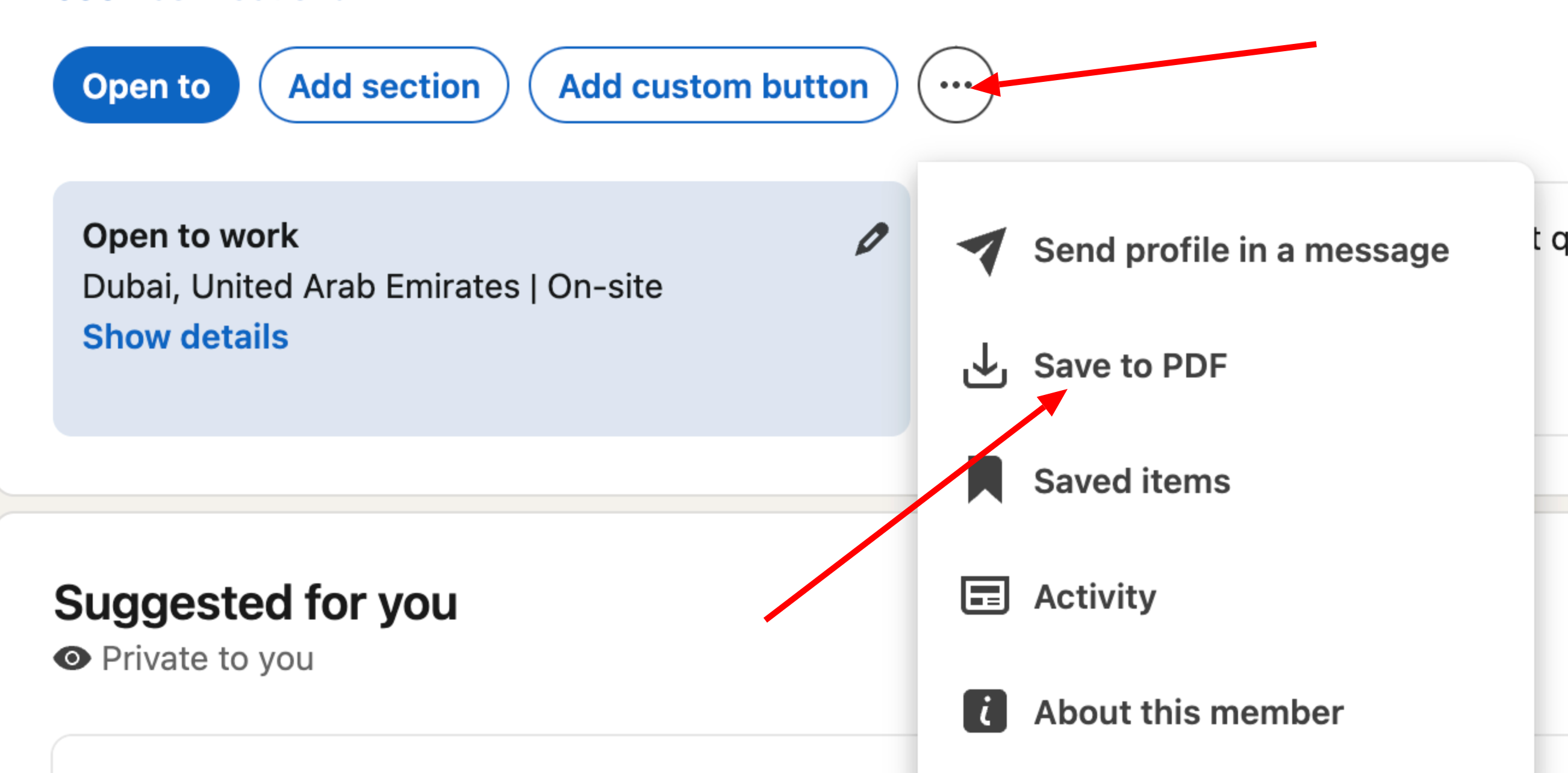
📥 How to save your LinkedIn profile as PDF
Drop your LinkedIn PDF here
or click to browse (PDF only, max 5MB)
💡 Don't have the PDF yet? Here's how to get it
Converting your LinkedIn profile...
Uploading LinkedIn PDF
This usually takes 15-30 seconds
Your resume & digital VCard will be ready in the FLEVV app. Download now:
📊 Section Breakdown
Based on your resume we identified areas to improve. For each section below you can see what we found, your score, and specific suggestions to strengthen your resume for ATS and recruiters.
How to Convert LinkedIn Profile to Resume PDF
Use our 1-click LinkedIn profile to resume converter to turn your LinkedIn PDF export into a polished, ATS-ready resume and digital VCard in seconds. Log in with Google, upload your LinkedIn PDF, and our AI does the rest — no manual copy-pasting required.
Step 1 — Export your LinkedIn PDF
On LinkedIn, go to your profile, click "More", then "Save to PDF". This downloads a complete snapshot of your profile including your work experience, education, skills, and contact information.
ATS-Ready Resume Format
Our AI restructures your LinkedIn content into a clean, recruiter-friendly resume format that passes Applicant Tracking System filters. No design skills needed — the output is optimised for both human readers and ATS scanners.
Digital VCard Created Automatically
Alongside your resume, Flevv instantly creates a shareable digital VCard from your LinkedIn data. Share it via QR code or a personal link so recruiters can save your contact with one tap.
AI Career Coach Included
Once your resume is ready in the Flevv app, your personal AI Career Coach is available to help you tailor it for specific roles, prepare for interviews, and navigate salary negotiations.
Multiple Resume Themes
After conversion, choose from 60+ resume themes inside the Flevv app to give your resume a professional look that stands out. Switch themes anytime without losing your content.
Download & Share Anywhere
With Pro or Pro Max, download your converted resume as a PDF from the Flevv app, and share your VCard link on WhatsApp, email, or any platform. Your resume and VCard are always up to date and accessible from your phone.
Why Convert LinkedIn to an ATS-Friendly Format?
Your LinkedIn profile already contains everything a recruiter needs — work history, skills, education, and achievements. Flevv's converter saves you hours of formatting work by instantly turning that data into a structured, ATS-optimised resume. Unlike manual copy-paste or generic resume builders, Flevv uses AI to intelligently map your LinkedIn content to the right resume sections, then gives you a digital VCard and AI Career Coach all in one place. Converting is free and usually takes 15–30 seconds.
Frequently asked questions
How to convert LinkedIn profile to resume PDF?
1. Open LinkedIn and go to your profile. 2. Click "More" in the introduction box. 3. Select "Save to PDF". 4. Drop that PDF file into the FLEVV LinkedIn to Resume converter above. 5. Our 1-click AI resume maker instantly structures your experience into an ATS-friendly CV.
Why convert LinkedIn to an ATS-friendly format?
Raw LinkedIn PDF exports contain custom layout elements and icons that cause Applicant Tracking Systems (ATS) to fail or drop candidate details. Converting to an ATS-optimized format ensures single-column parseability, clear keyword matching, and 95%+ pass rates on corporate portals.
How do I convert my LinkedIn profile to a resume?
On LinkedIn, open your profile, click "More", then "Save to PDF". Upload that PDF here, and Flevv builds a resume you can edit in the app.
Can I convert a LinkedIn profile by pasting its URL?
No. The converter reads the PDF you save from LinkedIn, so upload that file rather than a link.
How do I turn my LinkedIn PDF into a CV?
Save your profile from LinkedIn (More, then Save to PDF), upload the PDF on this page, and Flevv converts it into an ATS-friendly CV with AI. You can then edit it and add a matching digital VCard in the Flevv app.
Is the LinkedIn to resume converter free?
Converting your profile, editing the resume and choosing any of the 60+ themes are free. Downloading the resume as a PDF needs Pro or Pro Max, one-time passes starting at ₹399 for 30 days.
Do I need to sign in?
Yes. Sign in with Google, as the steps above describe, so your resume and digital VCard are saved to your Flevv account.
Related: Resume builder, free resume audit, digital VCard.
Questions? Email us at support@flevv.com.